 blog
Which Ergonomic Home Office Setup Is Best in Scottsdale?
Quick Summary
The best ergonomic home office setup starts with a chair that fits your body, since seat height, seat depth, and lumbar support matter more than price. Pair it with a desk where elbows bend near 90 degrees and the monitor sits about an arm's length away at eye level. Test chairs by sitting in them for ten minutes before buying.
- Feet should sit flat on the floor with knees near hip height.
- Leave a gap of a few finger-widths between the seat edge and the backs of your knees.
- Set armrests so your shoulders relax and elbows sit near 90 degrees.
- Place the top of the monitor at or just below eye level, about an arm's length away.
- Measure your room and chair before buying a desk to confirm clearance.
Table of Contents
- Why Ergonomics Matter for Scottsdale Remote Workers
- Choosing an Ergonomic Home Office Chair
- Setting Up an Ergonomic Home Office Desk
- Monitor, Keyboard, and Footrest Placement
- Ergonomic Office Solutions for Small Spaces and Hot Weather
- Budget Setup Bundles at Different Price Points
- Pairing Your Ergonomic Setup With a Productive Workday Out of the House
- Frequently Asked Questions
Why Ergonomics Matter for Scottsdale Remote Workers
Scottsdale parents who work from home often end up at a kitchen counter or a corner of the couch, and the back and neck pay for it. Choosing a well-built ergonomic home office setup is one of the simplest ways to protect your comfort during long workdays. A supported body and a workspace set up on purpose make focused work much easier.
Ergonomics is the practice of arranging your workspace so your body stays in a neutral, supported position. The goal is to reduce strain on your back, neck, shoulders, wrists, and eyes.
A common mistake is buying one expensive piece and assuming the rest of the setup will take care of itself. Chairs, desks, monitors, and input devices work together. If one is off, the others have to compensate.
OSHA guidance on computer workstation ergonomics
Choosing an Ergonomic Home Office Chair
The chair is often the piece most worth measuring before you buy. A chair that fits is not the most expensive one, it is the one whose adjustment ranges match your body.
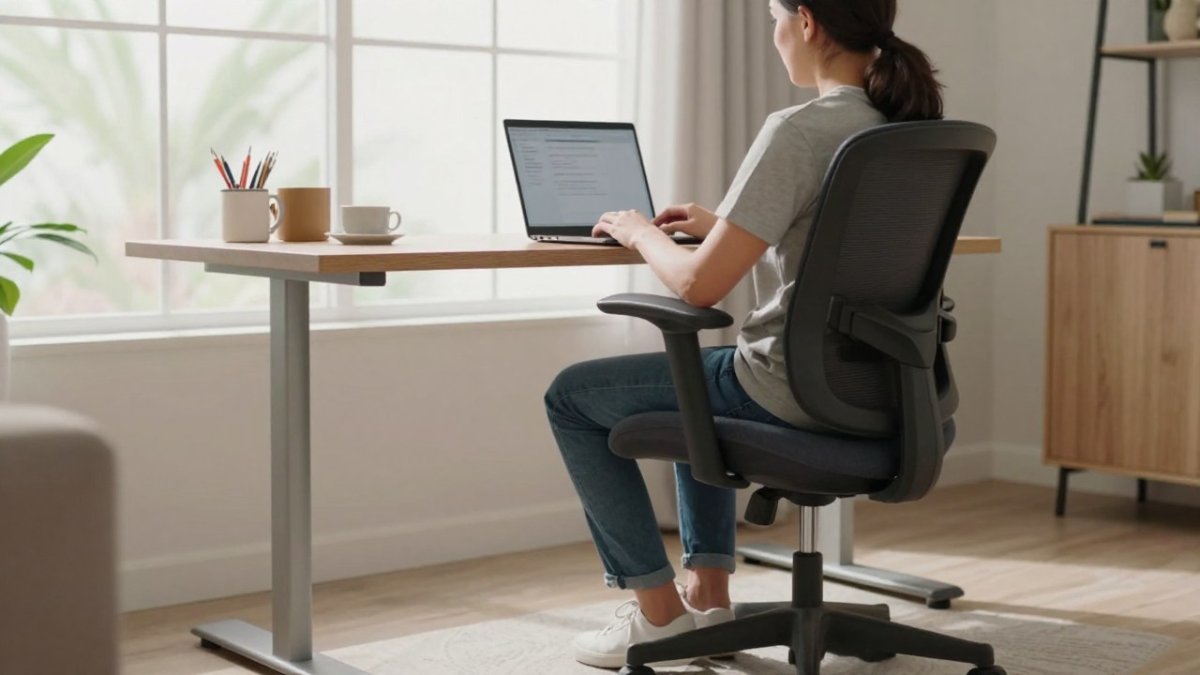
Start with seat height. You want your feet flat on the floor with knees at roughly the same height as your hips. If your legs are short, a chair with a low minimum seat height matters more than a plush cushion. If you are tall, check that the seat rises high enough that your thighs stay level rather than sloping upward.
Seat depth is the spec most shoppers ignore. You want a gap of a few finger-widths between the front edge of the seat and the back of your knees, so the edge does not press into the backs of your legs and restrict blood flow. A deep seat that looks generous can force shorter users to perch forward, which rounds the back within a few weeks.
Lumbar support should land in the small of your back, not at your waist. Adjustable lumbar height lets you move the curve to the right spot; a fixed lumbar pad helps only if it happens to sit where your spine curves. Armrests should let your shoulders relax and drop, with elbows near a 90-degree angle, armrests set too high push the shoulders up and create tension in the neck.
A few practical fit checks before you commit:
- Sit for at least ten minutes, not ten seconds, and type while seated.
- Confirm the seat height range covers your leg length, not just the average user's.
- Check that the seat pan depth leaves that finger-width gap behind your knees.
- Make sure the armrests adjust low enough that your shoulders stay down.
- Look at the return policy and warranty if you can only shop online.
Watch out: a chair that looks premium but has a fixed seat height can leave shorter users with dangling feet and rounded backs, and a chair with no lumbar adjustment may fit the showroom model's body but not yours.
Where to Find Office Chairs in Scottsdale
Sitting in a chair for ten minutes tells you more than any spec sheet. If you can only shop online, check the return policy and the adjustment range before ordering.
A reader looking for a local place to work comfortably may also want to compare a coworking space that offers a productive, ergonomic-friendly environment. Find a coworking space that matches your work style and see what to evaluate for focus, connectivity, and community.
The chair checks below cover the fit points that matter most before you buy.
| Check | What to look for | Why it matters |
|---|---|---|
| Seat height | Feet flat, knees near hip height | Short users need a low minimum |
| Seat depth | Gap of a few finger-widths behind knees | Stops edge pressing the legs |
| Lumbar support | Curve sits in the small of the back | Supports the spine's natural curve |
| Armrests | Shoulders relax, elbows near 90 degrees | High arms push shoulders up |
| Sitting test | Type seated for ten minutes | Shows fit better than specs |
Setting Up an Ergonomic Home Office Desk
Your desk should let your elbows sit at roughly a 90-degree angle with forearms level and wrists straight. The right height depends on your own body and chair, a tall user on a standard desk hunches, and a shorter user on the same desk ends up with shoulders raised. If your desk is fixed and the height is wrong, a keyboard tray or an adjustable chair can close the gap before you replace the desk.
Desk depth matters as much as height. Leave enough room for your monitor to sit at arm's length, roughly 20 to 40 inches from your eyes depending on screen size. Cramped desks push screens too close and encourage hunching; very deep desks can push the monitor so far back that you lean in to read it.
A sit-stand desk gives you the option to change position through the day, which many remote workers find helpful during long calls. The trade-off is cost and footprint: standing desks need clearance to rise, and a desk placed under a low window or shelf may not have room to travel. If you stand, the same rules apply, elbows near 90 degrees, monitor top at or just below eye level, and an anti-fatigue mat to reduce strain on your feet and lower back.
Here is a quick desk checklist:
- Elbows bent near 90 degrees when typing, forearms level
- Monitor top at or just below eye level, about an arm's length away
- Keyboard and mouse close enough that you do not reach
- Clear space under the desk for your legs, with no drawer blocking your knees
- Desk height that matches your chair, not the other way around
Fitting a Desk to Your Space and Your Body
This is where most generic guides stop, and where a home setup actually succeeds or fails. Measure your room before you shop: a desk needs clearance behind it for a chair to roll and for you to stand up, and a sit-stand desk needs vertical travel room above it.
For small spaces, a slim desk in the low-20s of inches deep, a wall-mounted monitor arm, and a chair that tucks under the surface can turn a corner or a closet nook into a workable station. For shared or hybrid setups, a height-adjustable desk and a monitor arm that swings out of the way let two people of different heights use the same spot without rebuilding it each day.
Watch out: buying a desk before measuring your chair and your room is the most common reason a setup feels wrong even after the equipment arrives, confirm the desk height range, depth, and clearance first.
Monitor, Keyboard, and Footrest Placement
Place your monitor about an arm's length away, with the top of the screen at or just below eye level. If you use a laptop, a stand plus a separate keyboard and mouse prevents the head-down posture that causes neck strain.
Keep your keyboard and mouse at the same height, close to the body edge of the desk. Many people also benefit from a footrest, especially when the chair cannot be lowered enough for flat feet.
A common approach for hybrid workers is to keep a single external monitor, keyboard, and mouse at home so the setup stays consistent from day to day.
Ergonomic Office Solutions for Small Spaces and Hot Weather
Not every Scottsdale home has a spare room. A compact setup can still work well. Look for wall-mounted monitor arms, slim desks that fold away, and chairs that tuck under a table. Position your desk away from direct west-facing windows to reduce glare on the screen and heat near the workspace.
Summer heat is a real factor here. Keep window coverings closed during the afternoon, and place your desk where a ceiling fan or a portable cooling unit can reach it without blowing directly on you.
Budget Setup Bundles at Different Price Points
Pricing depends on the brands you choose, the quantity you buy, and whether delivery or assembly is included. For current prices, check the websites of the retailers you are considering.
- Essentials tier: an adjustable chair, a monitor stand, and an external keyboard and mouse
- Mid-range tier: the essentials plus a height-adjustable desk and a footrest
- Full setup tier: the mid-range items plus a monitor arm, task lighting, and a sit-stand converter
Spend first on the chair and the screen height, since those affect posture most.
Pairing Your Ergonomic Setup With a Productive Workday Out of the House
Sometimes the best ergonomic setup is one you use away from home. A reader planning a workday outside the house may want to find local networking and work-community events in Scottsdale, and remote work networking events in Scottsdale can help you find people to work alongside.
Parents who need productive time away from home also need reliable childcare. Flexible childcare options for work-at-home parents can make an outside workday possible. Work & Stay combines flexible childcare with workspace for the parent, with memberships and day passes available and no long-term commitment. It is not a traditional daycare or an unrestricted drop-off service. Check current availability and program details before planning your day.
Once your home setup feels right, a change of place can also help you stay focused.
Frequently Asked Questions
What is the best ergonomic set-up for a home office?
A solid ergonomic home office starts with a chair that supports your lower back, a desk at elbow height, and a monitor placed at or just below eye level. Keep your feet flat, your wrists neutral, and your screen about an arm's length away. Pricing for each component varies by brand, size, and retailer, so compare current prices directly with suppliers before you buy. Adjust the setup over a few days until you can work comfortably for long stretches without strain.
How should I position my monitor and keyboard for good posture?
Place the top of your monitor at or slightly below eye level so your neck stays relaxed. Keep the screen roughly an arm's length away. Position the keyboard and mouse close enough that your elbows stay near your sides and your wrists remain straight. A monitor arm or keyboard tray can help you reach these positions on a fixed desk, and a footrest helps when your desk is set too high for your legs.
Is a standing desk better for an ergonomic home office?
A sit-stand desk gives you the option to alternate between sitting and standing, which can reduce long periods in one fixed position. The best choice depends on your body and work habits. Whatever desk you choose, set it so your forearms rest level with the keyboard. Switch positions periodically rather than standing or sitting all day, and use a supportive chair when you sit.
Where can I find ergonomic office chairs in Scottsdale?
Scottsdale has furniture retailers and office supply dealers that may carry ergonomic chairs. Before you buy, test the chair for seat height, lumbar support, and armrest adjustment. Ask about return policies and delivery timelines. For current pricing or availability, contact each retailer directly, since costs vary by model and provider.